Build your own MCP server to hand off content management system tasks to an AI agent

Have you ever worked with a CMS or CCMS that required lots of repetitive clicking through the UI to get things done? If the tool has a REST API, you can trade those clicks for natural language prompts by building an MCP (Model Context Protocol) server that's a simple API wrapper and use it with an AI agent skill. Here's how I did it using Claude to handle the coding.
A no-click workflow
I once needed to add labels to dozens of articles at a time in a Zendesk help site to optimize search results. I was looking at hours of tedious clicks and entering terms.
The Zendesk Help Center REST API gave me a better way. It offers these endpoints:
/articles/{article_id}/labels: List, add, or remove the labels on one article/articles/labels: List all labels or delete a label from every article/articles: List all articles and see each article's labels
I wired up an MCP server (to call the API and authenticate) and a Claude skill (to trigger the calls). This let me prompt Claude to handle any tasks the API supports.
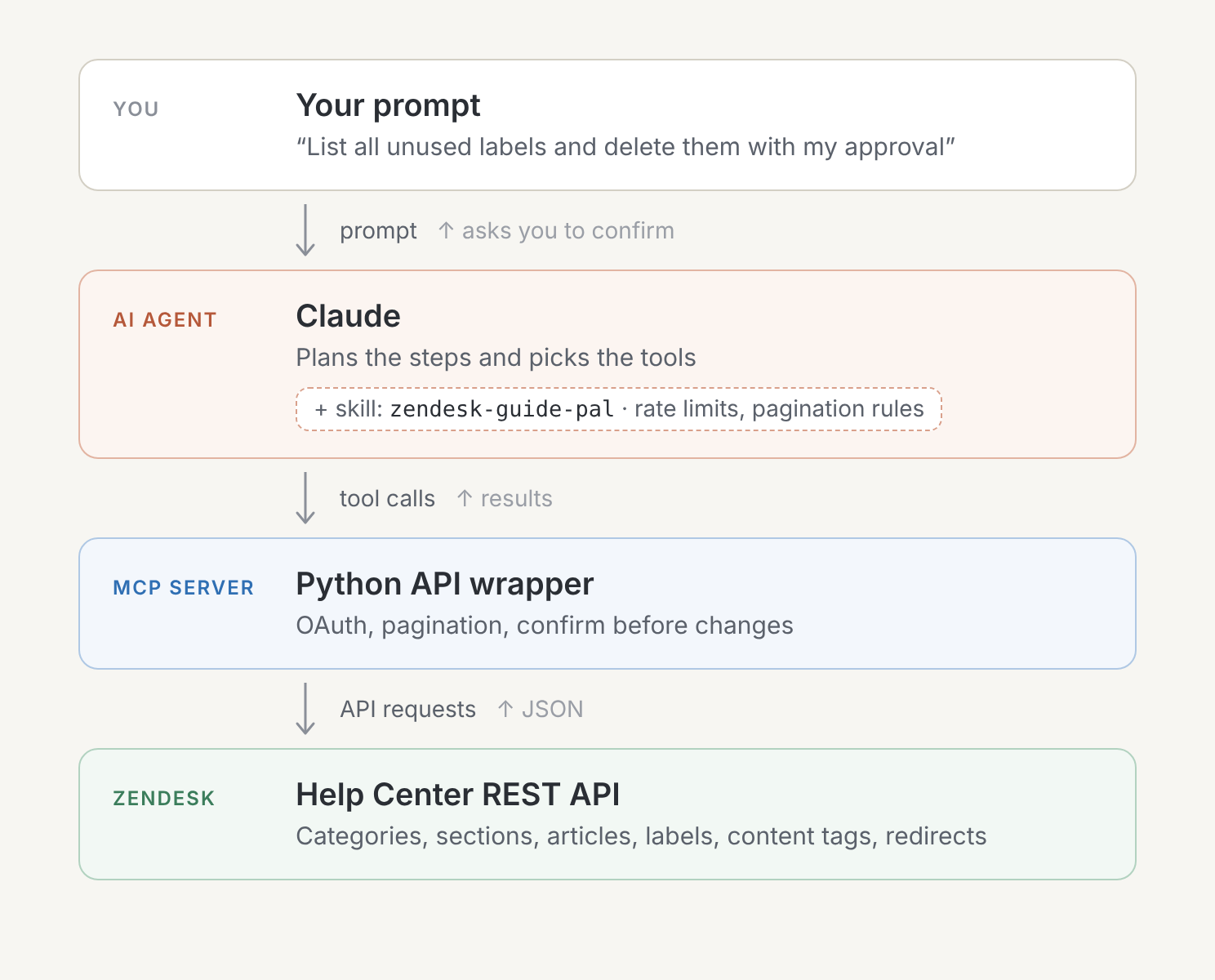
Building the MCP server
To build the MCP server, I prompted Claude with something like this:
Build a Python MCP server for managing labels on Zendesk Help Center (Guide) articles. It should allow OAuth authentication (see https://developer.zendesk.com/documentation/authentication/api-tokens-to-oauth).

It should let me perform actions for:

Labels:
- List all labels in the Help Center
- See how often each label is used, including labels that no article uses
- See the labels on a specific article
- Find all articles that have a given label, with each article's title, URL, section and category
- Find articles that have no labels
- Add or remove labels by name, on one article or many at once
- Delete labels I no longer need, one at a time or in bulk

Articles:
- List all articles, or only the articles in one section
- Get a specific article, including its full HTML body
- Search articles by keyword, with optional filters for section, label and locale, and sorting
- Return search results with each article's title, URL, section and category

Creating and updating articles:
- Create an article in a section, with a title, HTML body, locale and draft status (draft by default)
- Update an article's body or title

Requirements:

- Handle pagination so results are always complete.
- Every tool that adds, removes or deletes an entity must require confirm=True before it runs.
- Bulk actions should keep going when one item fails and report what succeeded and what failed.
- Give each tool a clear description so Claude knows when to use it.

When you're done, help me get a Zendesk client ID and secret and store them securely.
Building the skill
Then I built and iterated on a skill with Claude's help that included instructions like:
## Rate limits

Zendesk's general API rate limit is 700 requests per minute. Use a concurrency limit of 5 concurrent requests and exponential backoff on 429 responses (retry up to 3 times, starting at 1 second, doubling each attempt).

---

## Pagination

Most Help Center list endpoints (/help_center/...) use offset-based pagination with a next_page URL in the response. Fetch the next_page URL and combine results until next_page is null.

Guide endpoints (/guide/...), including redirect rules, use cursor-based pagination. Use page[size] and page[after] query parameters, and check meta.has_more and meta.after_cursor in the response. Do not use per_page or page on these endpoints. They silently return only the first page with no indication that more pages exist.

---

## Labels

Labels are additive. Posting a label that already exists on an article is a no-op (does not duplicate).
Invoking the skill to use the MCP server
When I invoked the skill, I gave it prompts like these (which I've genericized):
- Apply an "export_data" label to every article in the "Export data" section of the Data User Guide.
- Remove callouts with "Coming soon" at the top of all articles with a "sprint_201_release" label.
- List all articles that have no label, including their title and direct URL, and suggest labels.
- List all unused labels and delete them with my approval.
Expanding the skill
Later I expanded the MCP server and skill to include more API actions, like:
Content tags:
- List all content tags in the Help Center, optionally filtered by a name prefix
- See how often each content tag is used, including tags that no article uses
- See the content tags on a specific article, by name
- Find all articles that have a given content tag, with each article's title, URL, section and category
- Find articles that have no content tags, optionally excluding certain sections
- Add or remove content tags by name, on one article or many at once, and create any tag that doesn't exist yet
- Rename a content tag
- Delete content tags I no longer need

Categories and sections:
- List all categories
- Get details for a specific category
- List all sections, or only the sections in one category
- Get details for a specific section

Export:
- Export all articles from a section or category
- Fill in section names, category names, label names and content tag names instead of IDs
- Return both a full version with article bodies and a condensed version without them

Redirect rules:
- List all redirect rules
- Find the redirect rule for a specific source path
- List redirect rules with the article title and URL filled in for the "from" and "to" articles
- Create a redirect from one article to another, using article IDs instead of full URLs, with a choice of redirect status (such as 301 or 302)
- Delete a redirect rule

Themes:
- List all themes and show which one is live
- Get details for a specific theme
- Export a theme and extract its files into a local folder
- List a theme's local files, grouped into templates, assets, settings and other
- Read and edit individual theme files
- Package a local theme folder into a zip that's ready to upload, leaving out hidden files and old zips
- Import a theme zip as a new, unpublished theme
- Publish a theme so it becomes live
- Delete a theme that isn't live
Combining MCP server toolchains
For ultimate time savings, I used the Zendesk Guide MCP in tandem with an MCP server I built for another enterprise tool (Paligo CCMS) to perform multi-system actions, like:
- Publish the updated "Data User Guide" in Paligo to Zendesk and apply the Zendesk label "extract_data" to all new articles created in that guide in Paligo last week.
If you've worked with that toolchain before, you know how much time and effort a prompt like that saves! Any CMS with a REST API can work this way.
Is there a smarter way I could have done this? I would be grateful to know.